


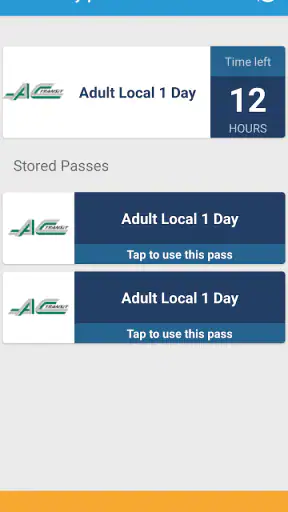
Buying a bus or train pass is usually easy until I am standing at an unfamiliar stop, trying to understand a local fare system while people wait behind me. Token Transit is built around removing that awkward step: it lets me purchase available public-transit passes on my phone and use the phone as the pass when riding. That narrow purpose gives the app a clear identity, and in my experience it is most useful when I already know I need transit but do not want to search for a ticket machine, handle cash, or learn a new local payment routine.
It is a free Travel & Local app from Token Transit, Inc., available for Everyone and running on Android devices using Android 5.0 or later. The app has been around since December 9, 2016, and its current version is 4.8.0. Its reach is substantial, with over one million installs, while its average rating sits at 4.3 from roughly three thousand ratings. Those figures suggest a service people return to for a practical task rather than a novelty app, although the experience still depends heavily on the transit system available in the place where you want to ride.
Buying a transit pass without changing your travel routine
The useful capability is digital fare access
The strongest idea here is not route discovery or trip planning. It is the ability to buy a transit pass before boarding and keep that pass on the phone. That distinction matters. Many travelers already use a map app to decide which bus or train to take, but the map does not always solve the separate problem of paying for the ride. Token Transit focuses on that missing link.
I find this especially helpful when visiting another city. Local transit can use unfamiliar ticket names, different fare zones, or separate rules for single rides and day passes. Instead of treating the fare machine as another part of the sightseeing puzzle, I can use the app to look for the pass offered by the participating transit service, complete the purchase, and keep the result ready for inspection. The phone becomes the place where the fare is stored and presented.
That sounds simple, but simplicity is the point. A good transit-payment tool should stay out of the way once the right pass is selected. The benefit is less about saving a few taps and more about reducing the number of physical and mental steps between arriving at a stop and getting on board.
There is also a useful separation between planning and payment. I can use whichever navigation tool I prefer to check the route, then use Token Transit for the fare itself. I do not have to abandon a familiar map app just because it does not sell the pass I need. Conversely, I do not need to turn this app into my entire travel planner if my only goal is purchasing and showing a transit fare.
What happens when I use it before boarding
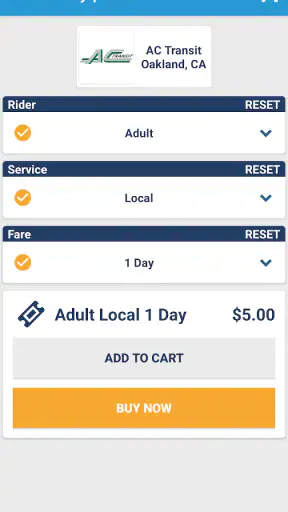
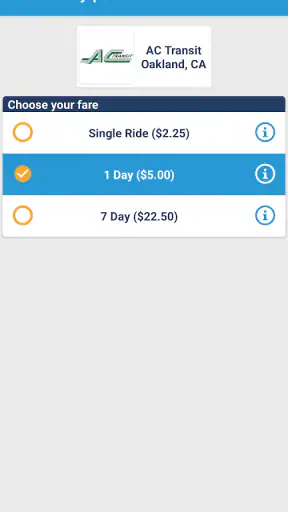
My preferred workflow is to open the app before I reach the vehicle, choose the relevant transit service, review the available pass choices, and buy the option that matches the journey. Doing this early is more comfortable than trying to make a decision while the bus is arriving. It also gives me time to notice whether I need a single ride, a longer-use pass, or another option offered by that particular service.
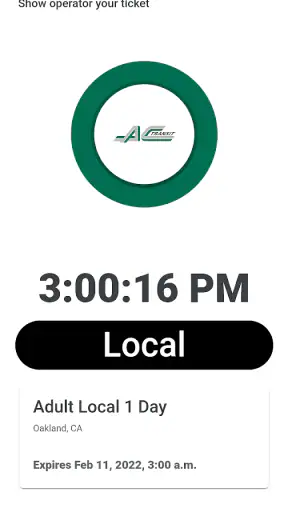
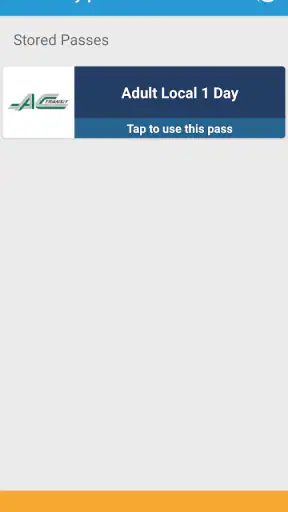
Once the pass is on the phone, I treat the screen as something I need to access quickly. I keep the phone charged, avoid burying the app under several open tasks, and check the pass before approaching the driver or fare inspection point. This is one of the less obvious habits that makes a mobile ticketing app feel dependable: the purchase is only half the workflow. The other half is being able to display it without fumbling.
I would not buy a pass at the exact moment the doors are closing unless there were no alternative. A weak connection, a forgotten payment detail, or an unexpected change in the available fare can turn a convenient process into a delay. Buying in advance is the practical advantage, not merely a precaution.
The app’s value also depends on selecting the correct local service. A city may have several transport operators, and a pass for one network is not automatically useful on another. I pay attention to the service name and the pass description rather than assuming that every bus in the area accepts the same digital fare. That small check is more important than any visual polish because a correctly purchased pass is what makes the app worthwhile.
Why the phone-based approach can be better than the usual alternatives
The traditional alternatives each have a weakness. Cash requires the right amount and may slow boarding. A station machine can be inconvenient when I am not near a station, and its interface may be unfamiliar. A physical pass can work well for regular commuters, but it is less attractive for a short visit or an occasional ride. Token Transit is strongest when I need a pass now, do not want to carry a separate ticket, and already have a working phone with me.
It is also more flexible than asking a local resident or driver where to buy a ticket, particularly when I arrive outside normal business hours. I can handle the purchase as part of my travel preparation instead of adding a separate stop to the itinerary. For visitors, that can make public transit feel less intimidating.
Still, a physical pass can be the better option for someone who rides every day and wants a dedicated card or pass that does not depend on a phone. A transit agency’s own app may also be preferable if it combines payment with detailed service alerts, account tools, or a broader local transport system. I see Token Transit as a focused payment companion, not a universal replacement for every official transit channel.
A realistic day in which it earns its place
Imagine I arrive in a city for a weekend, leave my luggage at a hotel, and need to take a bus to a museum, then continue across town for dinner. I know the route from my navigation app, but I do not know whether the local system expects cash, a paper ticket, or a day pass. Instead of searching for a kiosk near the first stop, I use Token Transit to find the available pass and buy it before leaving the hotel.
At the stop, I am not counting coins or trying to interpret a ticket machine. I have the phone ready, board, and present the pass when required. Later, if the pass covers more than one ride, I can use the same purchase for the next part of the day rather than starting the payment process again. The practical gain is not dramatic in isolation, but it removes repeated friction from a day that already contains unfamiliar streets, schedules, and directions.
This scenario also shows where preparation matters. I would confirm the pass type before setting out, keep the phone available, and avoid assuming that a pass valid for one service covers every connection. The app can simplify the fare purchase, but it cannot remove the need to understand the transit provider and the journey I am taking.
Small workflow choices that make a difference
My first tip is to make the purchase before walking to the stop whenever possible. That gives me a calmer moment to compare the pass choices and reduces the chance of holding up boarding. It is a better use of the app than treating it like a vending machine that must be operated under pressure.
My second tip is to think in terms of the whole day, not just the first ride. If I expect several trips, I compare the available pass options rather than automatically selecting the cheapest-looking single ride. A low upfront cost is not always the most convenient choice when I will soon need another fare. At the same time, I would not buy a longer-use pass simply because it sounds easier; the right choice depends on the transit service’s own terms and my actual plans.
My third tip is to separate ticket readiness from route readiness. Before I leave, I check both the route in my preferred navigation tool and the pass in Token Transit. This avoids a common mistake: having a valid fare but discovering at the stop that the bus or train is operated by a different service than expected.
My fourth tip is to treat the phone as essential travel equipment. A low battery, a damaged screen, or a phone that is difficult to unlock can make digital ticketing stressful. I would carry a charger or power bank on a long day and avoid relying on the app as my only plan when I know phone access may be unreliable.
The tradeoff: convenience depends on the surrounding system
The biggest limitation is not necessarily the purchase process. It is coverage and compatibility. Token Transit can only help where the relevant transit service makes passes available through it. If the local operator is not supported, the app cannot turn an unsupported fare into a usable ticket. I therefore consider the app most useful after checking that my intended service appears in it, rather than installing it and assuming every city will work the same way.
Fare rules are another source of friction. Public transportation is full of exceptions: different vehicles may use different fare products, and a pass that looks suitable may not apply to every leg of a mixed journey. I read the wording carefully and avoid treating a digital pass as a general-purpose travel permit. The convenience is real, but it rewards a little attention before purchase.
There is also a human factor. Some riders are comfortable showing a phone screen, while others prefer a card or paper ticket. If I am traveling with a child, helping an older relative, or managing several passengers, one phone-based workflow may be less convenient than separate physical fares. The app is better suited to an individual traveler who can control the device and present the pass when needed.
Another tradeoff is dependence on the phone at the moment of inspection. A physical ticket can remain usable even when the phone is out of battery, while a digital pass requires the device to be available. That does not make Token Transit a poor choice, but it changes how I prepare. I would not use it casually and then forget that the phone is now part of the ticketing process.
The app also should not be judged as a full replacement for a transit agency’s official information tools. If I need detailed disruption notices, complex fare rules, or a complete view of a regional network, an official channel or a dedicated journey planner may be more informative. Token Transit’s focused role is its strength, but that focus means I pair it with other tools when the trip itself is complicated.
Who gets the most value from it
I would recommend Token Transit first to occasional riders, visitors, students exploring a new area, and anyone who uses public transit often enough to dislike cash but not often enough to own a local physical pass. It is particularly useful when the journey begins away from a major station or ticket office. The ability to purchase on the phone can turn a separate errand into a quick preparation step.
It is also a good fit for people who prefer to keep travel documents in one place. Instead of carrying a paper ticket that can be misplaced, I can keep the fare on the device I am already using for directions and communication. That convenience is strongest when I am traveling light and want fewer objects to manage.
Regular commuters should make a more careful comparison. If the local transit authority offers a cheaper recurring product, a reloadable card, or a more complete official app, that option may be better for daily use. Token Transit makes occasional payment easier, but convenience alone does not guarantee the best long-term arrangement for a heavy rider.
I would also suggest skipping it for journeys where phone access is uncertain or where the transit system has strict fare combinations that are easier to manage through its own ticketing system. Someone traveling through several operators should verify each part of the itinerary before relying on one mobile purchase. In those cases, the app may still help with one segment, but it should not be assumed to solve the entire trip.
What the app’s reputation tells me
With more than a million installs and a 4.3 average from about three thousand ratings, Token Transit has reached a meaningful audience for a specialized travel task. I read that as evidence that mobile transit payment is useful to many people, not as a promise that every local fare experience will be flawless. The developer, Token Transit, Inc., has maintained the app across years of changing phone platforms and transit habits, and version 4.8.0 shows that it remains an active product rather than an abandoned ticket tool.
The Everyone age rating also fits the app’s practical purpose. It is not built around entertainment or complicated social interaction; its usefulness comes from helping a rider complete a specific travel task. I would still spend a minute learning the local pass choices before the first ride, because an accessible interface cannot replace the rider’s responsibility to choose the right fare.
My final recommendation for everyday travel
I like Token Transit because it solves one annoying part of public transportation without pretending to be the whole travel experience. When the local service is supported, I can buy a pass before boarding, keep it on my phone, and avoid the uncertainty of cash or an unfamiliar ticket machine. That is a meaningful improvement for visitors and occasional riders.
My recommendation comes with one condition: prepare before you need to board. Check the transit service, choose the pass carefully, and make sure the phone is ready to display it. If you want a comprehensive route planner, a permanent commuter card, or a ticketing system that covers every operator in a region, another option may suit you better.
For the specific job of turning a phone into a practical public-transit pass, however, I find it convincing. The best reason to use it is not that it replaces every transit tool, but that it removes one stressful step at exactly the moment unfamiliar travel can feel most complicated.


